I was sitting here looking at text between my old 1080 res 15.6" thinkpad and the much higher res of the macbook 16", and it doesn’t really make much of a shit. Ha ha. It really doesn’t. Sure, colors are a little nicer on the macbook, contrast is better, and some things are a little crisper, but meh, since with the sluggishness of the macbook display, the thinkpad display seems overall nicer to the eyes when scrolling around web pages and text files. Go figure. And white text looks overblown on the macbook. It’s a very pretty display to put a picture on. But in practical use? The ancient thinkpad display. And the display size difference is so negligible.
Fun over. Sending it back. Going mac for a day almost killed me from shame. 
Logic Pro did look pretty nice though.
We have all thought of straying from the light at some point. Glad to have you back. 
The 17" screen requirement really reduces the selection of laptops, at first glance there’s a nice Asus out there:
Hardly anywhere sells it from what I can see, and no reviews. The battery life should be alright if you turn off the dGPU and instead of a bag of dongles, an external HDD and some spare cravats you can take a powerbank with you to match the battery power of a handbagtop.
Being practical for what is actually available, I’ll likely have to drop the 17" requirement. And 1080 is not ideal to me, but it’s good enough really.
That Zenbook looks good, but the Nvidia card might be a pain on linux. And yea, finding it available.
I’m eyeballing an HP Omen 16, since they did away with the comic book cosmetics and there are some reports of it running fine on linux (others say otherwise though). Ryzen 7 6800 and RX 6650M. The only real hangup is that HP tends to be bastards about whitelisting wifi cards in their bios, and the stock wifi card is reported to be trash, so replacing it might be a no-go.
Returned. Worth mentioning. While the display on that thing looked very pretty, it was a real eye killer. PWM, slow response time, soft looking fonts (smoothing), and something with the color that I didn’t have time to look into. Back and forth from my old thinkpad to the macbook was very noticeable for eye comfort vs. visual appeal.
I have to say that the pumpkin spice latte draw is strong with the M4 Mac Mini 16GB. Cheap, guaranteed strong low latency performance…

I have thought the same thing on numerous occasions. The Air’s too.
I know, I know… after all these years!!! 
Have you seen the docks?:
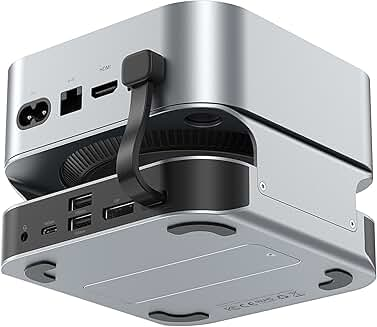
So the 256GB doesn’t matter much with a couple (?) of NVMe drives in them…
That is the first I have seen of it. Looks pretty slick. And yea, you’re right. It matters for an Air, not so much for a Mini.
As a few other people have pointed out, you can’t build a computer, even if you assemble everything yourself, that is as powerful as the base model mac mini, for less money.
We have some of the M4 powered iMacs at work.
Regarding external storage, I’ve got a couple of these for when I need to do some raw video capture on a mac with limited internal storage.
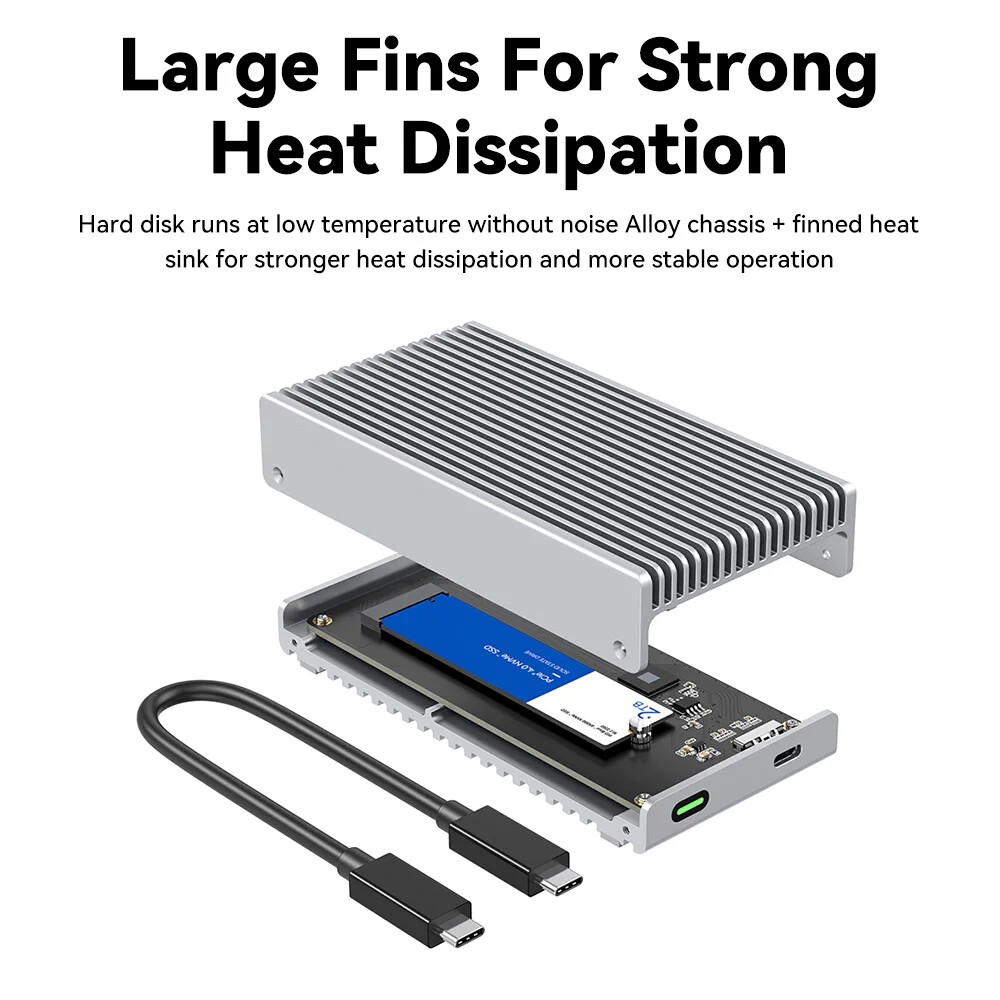
$59 Australian on Ali Express. No annoying fan, and large enough heatsink with good enough physical connection to the drive, and just as importantly as it turns out the asmedia chipset.
Had dropouts and disconnections with some other fanless options I tried, that either had poor mechanical design connecting the drive to the metal case, or had no physical connection to cool the chipset at all.
Thanks to the asmedia chipset, it works in thunderbolt 3 and 4 modes, and in basic USB mode.
I’ve been using the Team Z44A7 or Lexar NM790 drives, because they are TLC drives with good sustained write performance. No DRAM, but that makes no difference for video capture work.
The one I’ve got on my desk right now has a 4TB Team Z44A7. Connected to a 2018 mac mini I’ve got here at home, I can write to it at around 1.5GB/s and read from it at around 2.4GB/s
The drive is capable of more than that, so I assume the bottleneck is the asmedia chipset.
How’s the low latency audio compared to a well-tuned PC? I remember I had 192kHz running at 32 samples (low workload) on Linux with zero pops/clicks/crackles. That was Linux though, far too much hassle otherwise.
I’d have to do an apples to apples comparison with the same audio interface.
The circumstances to do that haven’t presented themselves thus far. I’m pretty sure I’ll have access to a RME UFX II early next year that I might get a chance to do some testing on one of my own DAW PC systems, and on the mac’s.
Pretty much everything in the studios at work, and at the radio station is mac only, so don’t get to see much side by side comparison.
Actually, I suppose a DAWbench test would still be useful, even if the audio interfaces we have aren’t particularly low latency. Will still give a result for how much system load at a given buffer size can be sustained without dropouts.
I’ll do that when I get a chance.
Thanks, I’m thinking of pulling the trigger but if low latency is bad I don’t want to replay thousands of Mac love posts in my head, which would give me Thanos levels applehate for a good while!
I thought it would be easy, but it’s TAFE.
Because all the M4 based systems I have access to are managed by our IT deparment, I can’t install the plugins that work with the standard DAWbench projects…
I’ll have to make my own version of the project files with one of the plugins we already have installed as part of our standard protools package.
There are plenty of other machines I do have admin access to, just none of the classroom M4 iMac’s.
If you want to know how well things run on a M2 Max powered Mac Studio, or an Intel powered Mac Pro, no problem, just not the exact system you want information about.
Oh, no worries. I’m just a bit suspicious that the Kool Aid goggles hide DPC issues. I’ve read Mac users saying all sorts of bad thing about OSX/macOS happenings and then literally saying stuff along the lines of “at least we’re not on PCs”!
Re latency/interfaces I’ve just bought a new interface and gave the new(ish) Roland one to one of my kids’ pals who’s getting into music. After using the UAC-2 pretty much anything’s a downgrade so I just bought the UAC-8.
I wouldn’t buy a Mac based on any vague claims of low audio latency due to Apple fairy dust. I would buy one based on performance and features for price. But I won’t be buying any new Apple (or other big tech company) stuff to profit them, knowing that they are contributing to genocide.
Yeah, I wouldn’t be surprised if low latency wasn’t as good as a well tuned PC setup, but I get that it’ll probably be better than most randomly selected consumer PCs. I’ve thought myself through owning one and the inability to upgrade memory seems like a blocker. I won’t pay $1000 for an extra 16GB or whatever and at the same time I won’t place a bet that I won’t need that at some point, turning the 16GB model into a door stop.
That’s it in a nutshell.
Either a base model fits your needs for the foreseeable future, or it’s a no go.
I just bought a 32 gb memory ugprade for my old desktop for $58. 